AiTM Detectors
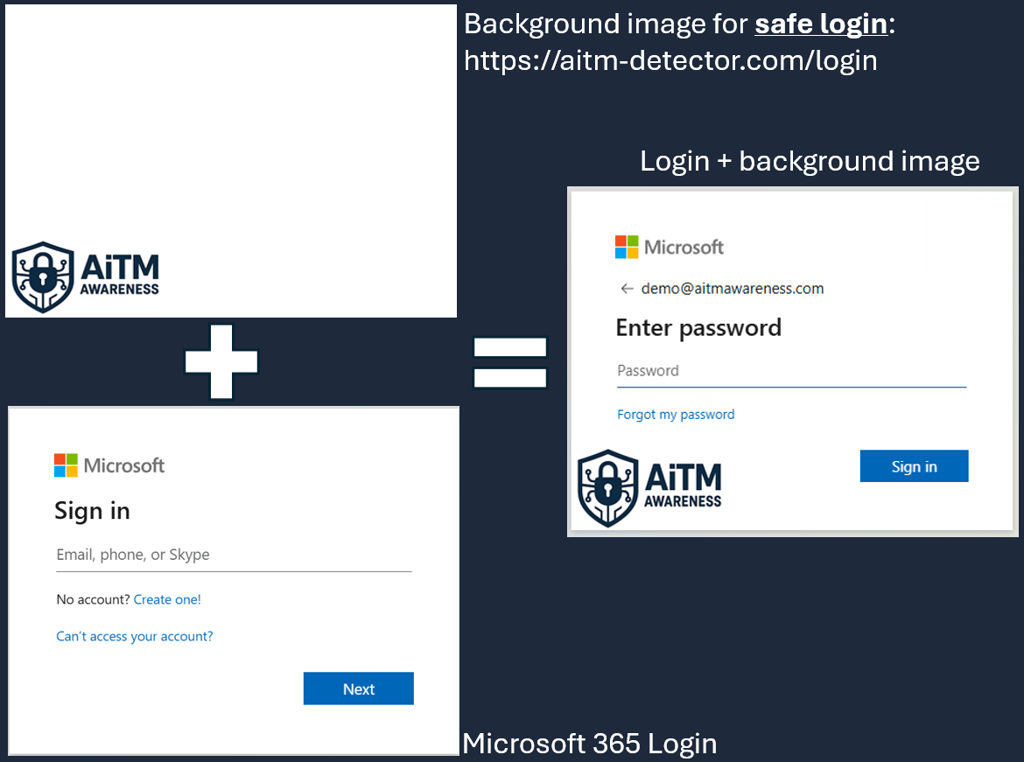
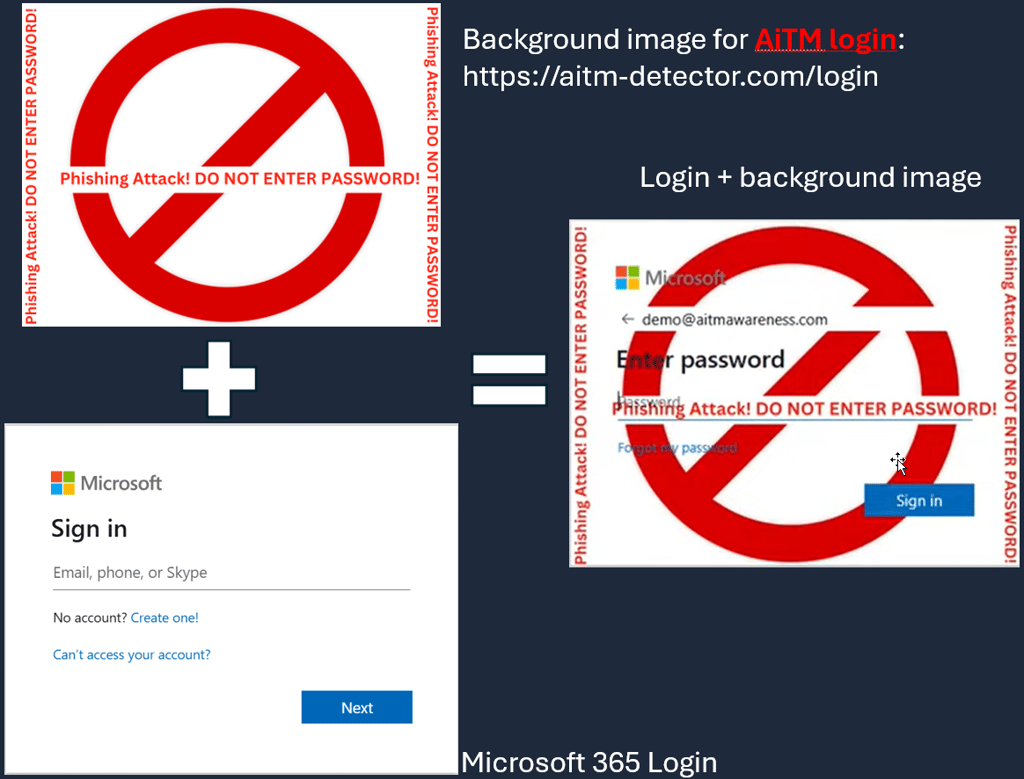
AiTM Detectors can be an effective tool to alert users when they encounter an AiTM phishing website. The system works without requiring any installation on the user's device. As soon as a user enters their username—before they even enter their password—the login page background is replaced with a warning, advising the user not to submit their credentials.
Although this solution can be highly effective in certain situations, attackers can bypass it, meaning it doesn't provide protection against all phishing attacks.
This solution was first published by Wesley Neelen & Erik Remmelzwaal from Zolder with Matt Kiely and Kelvin Tegelaar who contributed to it in the open-source implementation under Clarion and the integration to CIPP.
The AiTM Detector is currently available as a hosted solution using the following services:
Open-source implementation using Azure Function App:
You can watch the video below for a walkthrough, or review the details provided on this page.

How the AiTM Detector Works
The AiTM Detector is a clever technique that uses a built-in Microsoft 365 feature—custom sign-in page branding—to detect when a user is interacting with an AiTM phishing site. Because Microsoft allows organizations to load a custom background image from an external URL, this opens a unique opportunity to identify phishing activity based on how the image is requested.
Below is a detailed explanation of how the process works.
1. User goes to sign-in page
User goes to login to Microsoft 365 - either directly or via an AiTM phishing website.


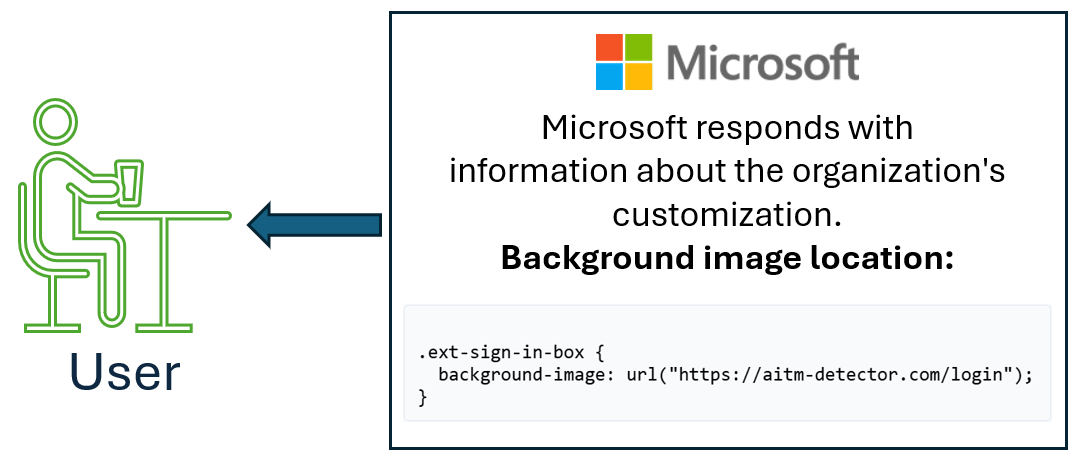
2. Microsoft 365 provides user's browser image location
Upon an administrator configuring the hosted image, the user's browser receives the location where the image is hosted at.
3. The browser loads the background image
As the Microsoft 365 login page renders, the user’s browser automatically requests your hosted background image and applies it to the page.
On a normal sign-in, it loads a normal login or an organization's customized background image.
On a sign-in where a user is on an AiTM phishing website, it loads the warning site.
Why AiTM Detectors don't generally work
AiTM Detectors that rely on referrer-based checks are clever and can be effective in certain situations, but they are not reliable against most modern adversary-in-the-middle (AiTM) phishing platforms. As outlined by Keanu Nys (2024) and demonstrated in real-world investigations, attackers have developed multiple ways to bypass these detection techniques— primarily by manipulating how the login page’s background image is requested and delivered.
How Referrer-Based Bypass Techniques Work
Many AiTM platforms operate as indirect proxy systems. These systems do not allow the victim’s browser to directly request the organization’s externally hosted login background image. Instead, the phishing platform:
fetches the image itself and serves it to the victim, or
does not load the custom branding at all, presenting a generic login screen.
Because the victim’s browser never makes a direct request to the organization’s image host, the host never receives a referrer header that reveals the phishing domain. Without this signal, the detector cannot trigger, and users see either the expected branded login page or a normal Microsoft login—both of which appear legitimate.
A documented bypass from late 2025 demonstrated this clearly: the phishing platform served the organization’s background image directly, while presenting a referrer value that appeared to originate from Microsoft 365. As a result, the detector registered nothing suspicious, and the user saw a familiar, trusted login experience.
For a full technical breakdown of this bypass, see the original blog post:
Browser-Extension–Based AiTM Detection
Newer detection approaches avoid referrer-based methods entirely. Companies such as Push Security, Check by CyberDrain, Attic Security, and others have developed browser-extension–based AiTM detectors that operate inside the browser itself.
Benefits
Harder for attackers to spoof
Able to detect manipulations happening within the browser
Not dependent on external assets or referrer headers
Challenges
Requires deployment across all endpoints
Limited or inconsistent coverage on mobile devices
Key Takeaways
Referrer-based AiTM detectors are helpful but not reliable. Attackers controlling the proxy can manipulate how images and assets are served, bypassing these checks entirely.
Phish-resistant MFA is the most powerful defense. Technologies like FIDO2, passkeys, certificate-based authentication, and token protection prevent attackers from replaying intercepted session tokens.
Use layered security controls. Conditional Access, risk-based sign-in policies, and continuous monitoring significantly reduce the success rate of AiTM attacks.
Monitor telemetry closely. Look for suspicious token reuse, sign-ins from unexpected clients, or behavior consistent with proxy-based login activity.
Continue educating users. Visual warnings and detectors help, but only as part of a broader awareness and training program.
Assume attackers will adapt. No single detector should be treated as a guaranteed protection mechanism—AiTM defenses require multiple layers working together.